This project involved a comprehensive UX and accessibility audit of an iOS habit-tracking application approaching App Store submission. The goal was to evaluate the product against Apple’s Human Interface Guidelines, Nielsen Norman Group usability heuristics, and VoiceOver accessibility standards, with a focus on real task completion rather than surface-level compliance. The review covered core flows such as habit creation, rewards, tracking modes, settings, and error recovery, identifying issues related to non-standard components, inconsistent icon usage, focus order, contrast, and accessibility roles. Deliverables included an executive summary, a prioritized heuristic evaluation, accessibility-specific findings with severity ratings, and actionable recommendations aligned with standard iOS and SwiftUI patterns to reduce App Store rejection risk and improve usability for all users.
The primary goal of this project was to ensure the app could be approved and published on the App Store as quickly as possible by identifying and resolving any UX, accessibility, and compliance issues that could trigger rejection. A secondary goal was to reduce usability friction and accessibility risk by aligning the experience with Apple’s Human Interface Guidelines and standard iOS patterns. Beyond launch readiness, the work also aimed to establish a solid UX foundation that could support future iterations without costly rework.
The app began as a working prototype built rapidly in SwiftUI using a vibe coding approach to validate the concept and deliver core functionality quickly. While effective for early momentum, this resulted in UX and accessibility gaps, including reliance on custom non standard iOS components and inconsistent interaction patterns that increase App Store review risk. With limited development capacity for large refactors, the challenge was to identify high impact, SwiftUI friendly improvements that prioritize standard system components and accessibility first patterns in order to get the app approved and shipped to the App Store as quickly as possible.
The solution focused on clearly defining UX deliverables that would move the app toward App Store approval with minimal development risk. I produced a comprehensive heuristic evaluation grounded in Apple Human Interface Guidelines and accessibility best practices, identifying usability, consistency, and VoiceOver issues across all core flows. In parallel, I created a detailed Figma board with screen by screen visual annotations that highlighted each problem, explained why it mattered, and proposed concrete, SwiftUI appropriate solutions using standard iOS components wherever possible. Each finding was documented both visually and in writing, giving the team a practical, implementation ready reference they could act on immediately or phase into future builds.
To close the work, I delivered an executive summary and a proposed roadmap that prioritized fixes required for initial App Store submission, while clearly outlining secondary improvements that could be addressed in later builds.
Heuristic evaluation is a structured UX review method based on established usability principles. It helps identify usability, consistency, and accessibility issues early, without requiring user testing. This approach is especially effective for validating production-ready interfaces, uncovering friction in core flows, and assessing platform guideline compliance.
Each screen and interaction was reviewed using Nielsen Norman Group usability heuristics, Apple Human Interface Guidelines, and SwiftUI accessibility best practices. Findings were documented in writing, with clear references to the affected screens and user flows.
Every issue was assigned a severity rating to support prioritization and App Store readiness planning:
The heuristic evaluation surfaced issues across visual consistency, interaction patterns, and accessibility, with the most severe findings concentrated in VoiceOver behavior and accessibility semantics. Several controls were announced with incorrect roles or traits, focus order increased swipe count and confusion, and some states were not communicated at all to assistive technologies. These issues significantly impact task completion for VoiceOver users and represent the highest usability risk in the product.
Two critical Severity 4 issues were identified that are likely to result in App Store rejection if unaddressed. The first is the absence of a support or contact information entry, which is required for App Store review and user support. The second is the absence of a privacy policy statement. Even though the app does not collect or transmit user data and stores all information on device, Apple still requires a clear privacy policy disclosure.
Beyond App Store compliance risks, the evaluation produced a prioritized list of fixes with severity ratings from cosmetic to critical. This made it possible to clearly separate blocking issues required for initial submission from secondary improvements that can be safely addressed in later builds, while keeping the overall product stable and shippable.
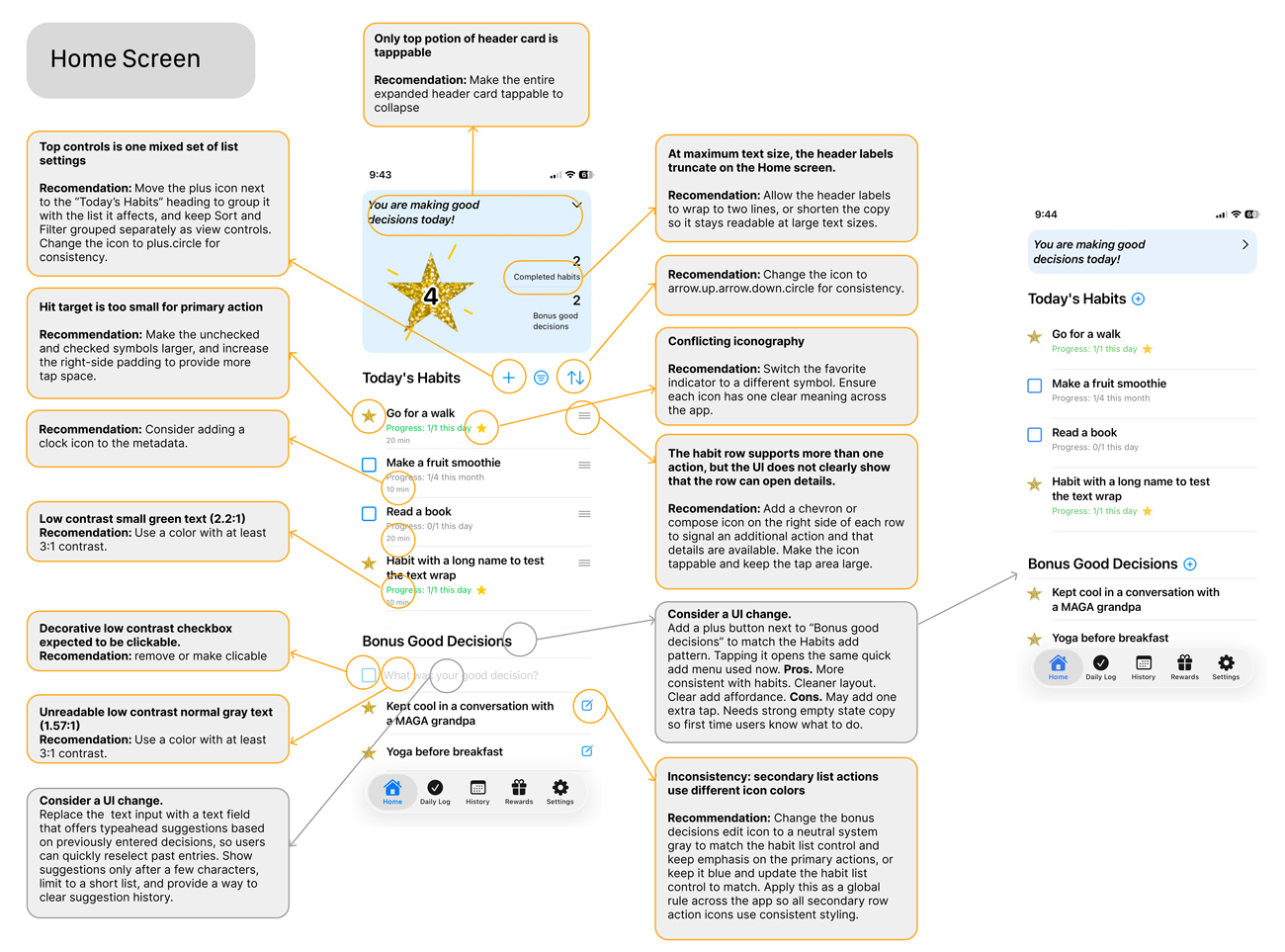
Each screen is documented with side by side annotations that identify the issue, explain the impact on usability or accessibility, and propose a clear solution. Visual callouts highlight incorrect roles, missing labels, low contrast states, focus order problems, and nonstandard components. When applicable, mockups with the proposed fixes implemented are also available for quick visual reference.
Each screen is documented with side by side annotations that identify the issue, explain the impact on usability or accessibility, and propose a clear solution. Visual callouts highlight incorrect roles, missing labels, low contrast states, focus order problems, and non standard components.
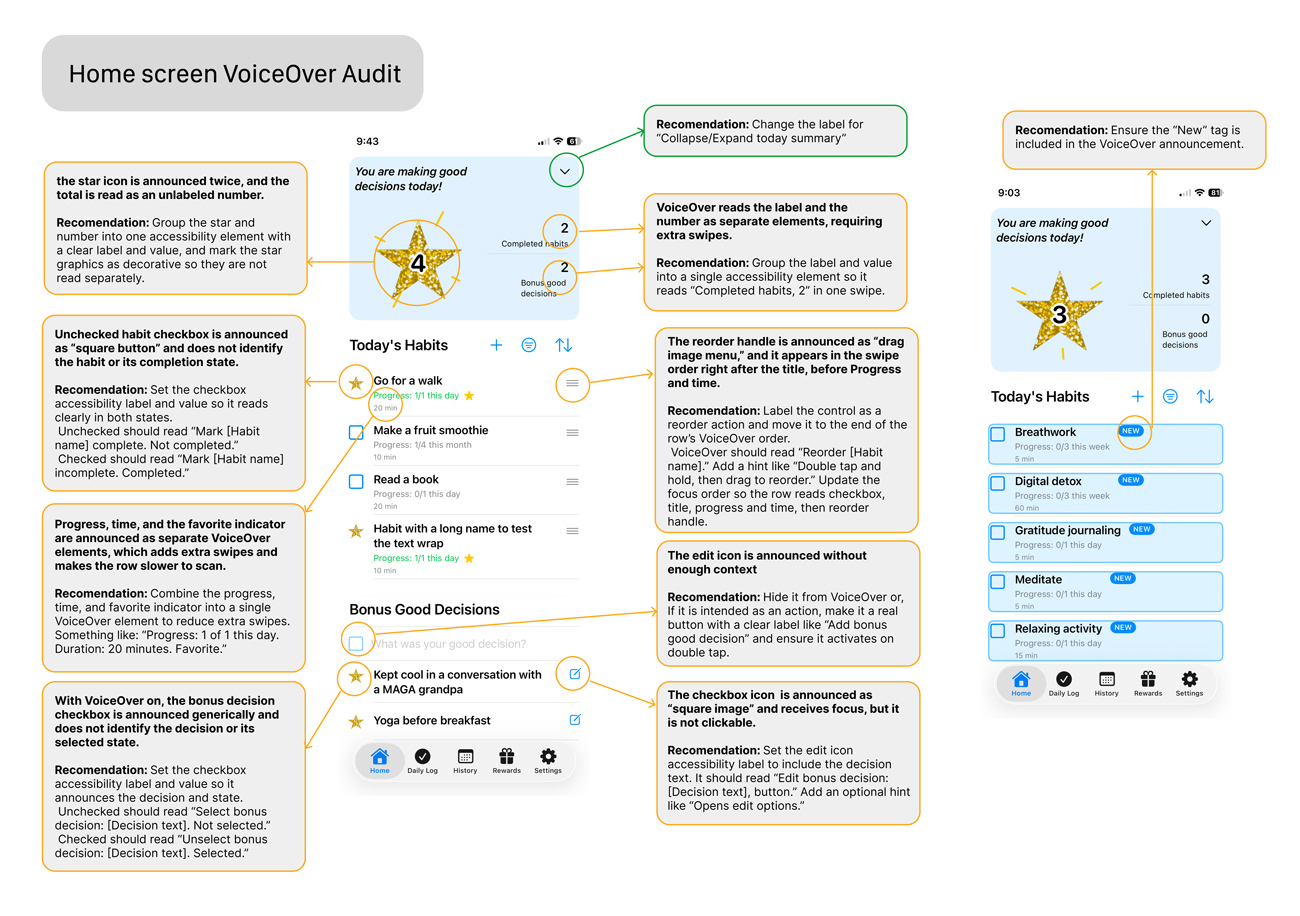
A dedicated VoiceOver review was conducted across all core screens to evaluate real world usability for screen reader users. Each screen was tested for correct roles and traits, logical focus order, meaningful labels, and clear announcements of state and available actions. The review identified several high impact issues where custom components were announced incorrectly, focus order increased swipe count, or state changes were not communicated, leading to slower task completion or potential task failure. For each issue, concrete recommendations were provided using standard SwiftUI accessibility modifiers to ensure predictable behavior, reduce cognitive load, and align with Apple Human Interface Guidelines.
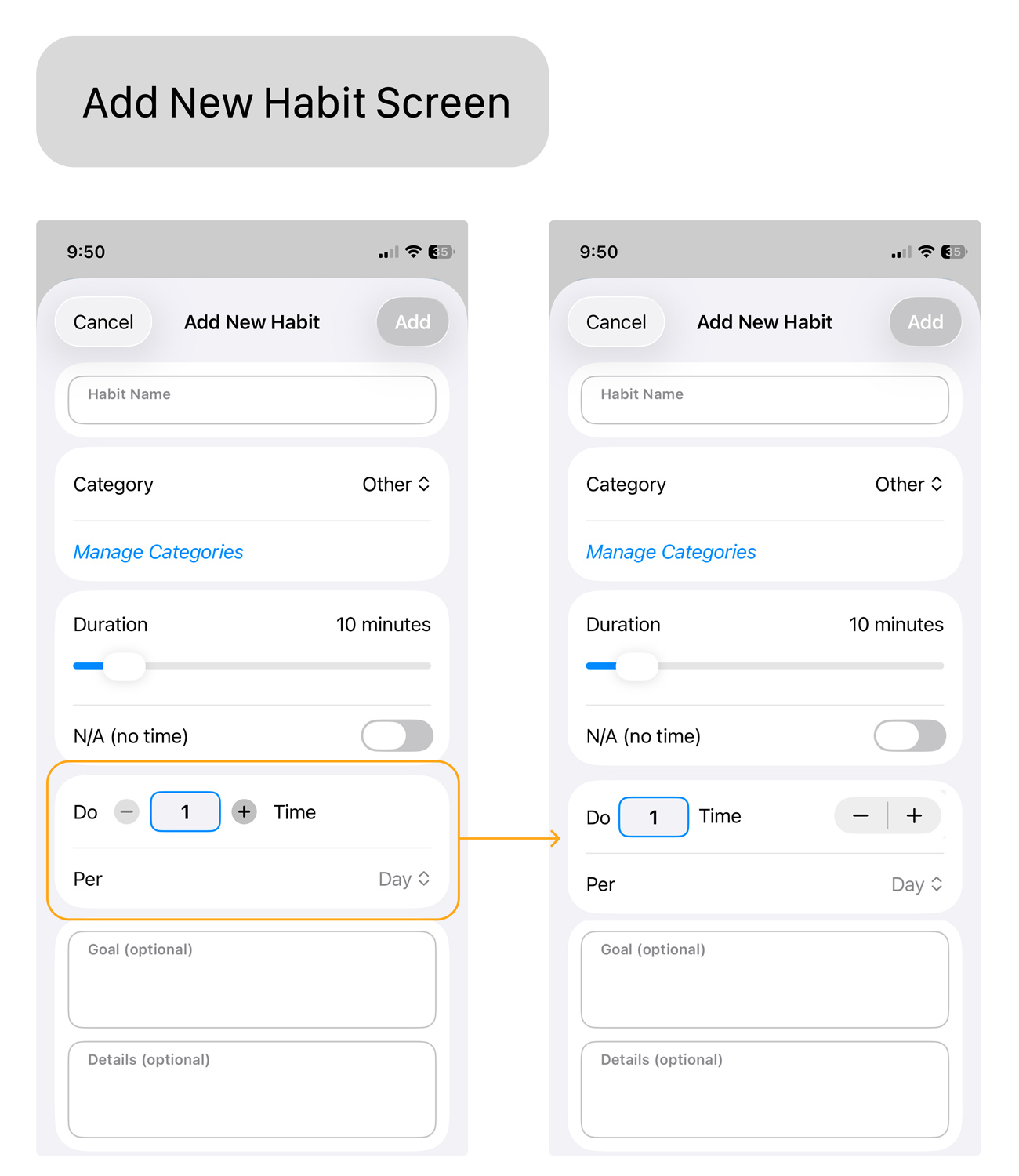
Several interactions relied on custom, nonstandard UI components that diverged from familiar iOS patterns and introduced accessibility risk, particularly for VoiceOver users.
Wherever possible, these components were mapped to standard SwiftUI controls such as Toggle, Stepper, Picker, and system List rows with built in navigation and reordering. Replacing custom elements with standard components improves consistency with Apple Human Interface Guidelines, delivers accessibility support out of the box, reduces implementation and QA effort.
The app has a strong visual foundation and clear, easy to follow core flows. The primary risks identified during review relate to consistency and accessibility. Several icons are used with different meanings across screens, some text and controls fall below recommended contrast levels, and multiple elements are announced incorrectly or out of order in VoiceOver. These issues can lead to mis taps, slower task completion, and in a few cases, task failure for VoiceOver users.
The app largely relies on standard iOS components, with a small number of custom implementations. Functionally, the product is stable, with no critical bugs or dead ends identified during evaluation. The design is minimal and approachable, with a short learning curve and well considered user flows.
Overall, the app is well beyond the MVP stage. With a focused set of high severity fixes, it is capable of meeting App Store submission standards. The most critical blockers for approval are the absence of required Privacy Policy and Support or Contact information, both of which must be addressed prior to submission.
All high-severity issues identified during the review were addressed prior to submission. Critical accessibility and compliance gaps were resolved, including App Store approval requirements. The app was successfully approved by Apple and is now available on the App Store.
Download the App Visit App's WebsiteAleks exceeded my expectations in conducting a UX/UI review of my first app and preparing a superb recommendations report. He guided me through the final steps of posting my app, including creating a list of the must-fix and nice-to-fix updates to make before posting. Aleks designed dozens of extremely helpful Figma boards to annotate specific suggestions related to usability, accessibility, and design. I would 10/10 recommend Aleks for reviewing any and all digital products in the future!
Jennifer Lynn McCulley, Ph.D., PMP
© 2026 misunin.com

|

|

|

|

|

|

|

|